CDebugWidget
Overview
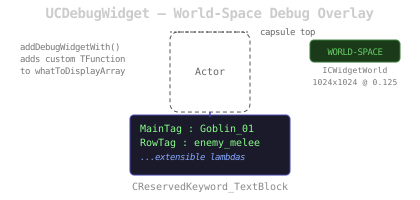
UCDebugWidget is a world-projected debug text overlay. It displays dynamic text information about an actor using an extensible array of display functions. By default it shows the actor’s MainTag and RowTag from UCInitializerComponent. Other systems can add custom display lines via addDebugWidgetWith.
Implements ICWidgetWorld for world-space projection above the actor’s capsule.
Functions
| Name | Description |
|---|---|
| consume | Initializes the widget: sets source actor |
| textBlockText | Builds the display text by calling all functions in whatToDisplayArray |
| addDebugWidgetWith | Adds a custom display function TFunction<FText(AActor*)> to the display array |
| worldData | Returns world projection data: 1024x1024 draw size, positioned above the capsule, scaled to 0.125 |