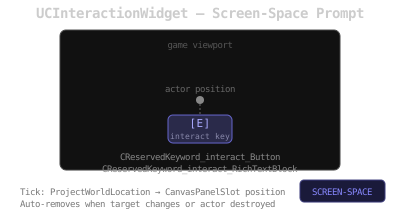
UCInteractionWidget displays an interaction prompt button that follows the target actor’s world position projected to screen space. It auto-removes when the source actor or target is destroyed, or when the interaction target changes.
Functions
Name
Description
consume
Initializes the widget: sets source actor, target actor and interaction key label
interactButtonClick
Executes the interaction via UCInteractionComponent::executeInteraction
// UCInteractionWidget receives data via consume:
// - object: source actor (player)
// - objectArray[0]: actor to interact with
// - aText: optional custom label. If empty, the mapped interact key name is used.

// On tick, the widget projects actorToInteractWith world location to screen
// and repositions the button via UCanvasPanelSlot.
// If the interaction target changes (CInteractionComponent::actorToInteractWith differs),
// the widget removes itself.

// interactButtonClick delegates to:
//   UCInteractionComponent::executeInteraction(sourceActor)