CSkillWidget

UCSkillDockWidget visual layout UCSkillDockWidget visual layout

Overview

The skill widget system provides a skill dock bar with animated buttons. UCSkillDockWidget listens to UCSkillComponent::onSkillListChange and dynamically spawns UCSkillDockButtonWidget instances. Each button displays the skill icon, handles cooldown animation, pop animation and a red-cross animation on failed use. Tooltips are provided by UCSkillTooltipDockButtonWidget.

UCSkillDockWidget

Name Description
consume Initializes the dock: sets source actor, binds to onSkillListChange delegate
whenSkillUpdated Rebuilds the dock by spawning a button widget per skill in the array
retrieveButtonClass Returns the button widget class (default: CSkillButtonWidgetDefault). Override in Blueprint to customize
// UCSkillDockWidget receives data via consume:
// - object: source actor (player)

// It binds to UCSkillComponent::onSkillListChange on the source actor.
// When the skill list changes, whenSkillUpdated clears the dock panel
// and spawns one UCSkillDockButtonWidget per skill.
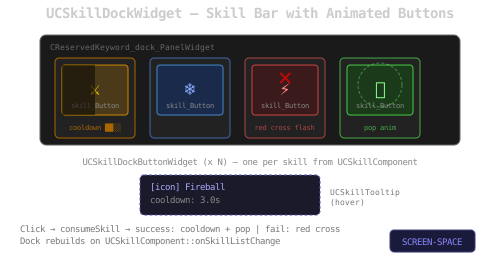
UCSkillDockButtonWidget

Name Description
consume Initializes the button: retrieves skill metadata (icon, cooldown, label, color), alters button appearance
alterAspect Sets button brush for Normal/Hovered/Pressed/Disabled states using the skill icon and base color
assignTooltip Creates and assigns a tooltip widget on the button
buttonClicked Attempts to consume the skill. On success: plays cooldown and pop animations. On failure: plays red-cross animation
playCooldownAnimation Plays the cooldown overlay animation scaled to the skill’s cooldown duration
playPopAnimation Plays a scale/opacity pop effect on the skill icon
playRedcroosAnimation Plays a brief red-cross flash animation
retrieveTooltipClass Returns the tooltip widget class (default: CSkillButtonTooltipWidgetDefault). Override in Blueprint
// UCSkillDockButtonWidget receives data via consume:
// - object: source actor
// - aName: skill FName

// Skill metadata (icon, cooldown, label, baseColor) is retrieved from
// CoordinatorUtility::retrieveSkillMetadata(skill).

// On click, SkillUtility::consumeSkill is called.
// Success: button is disabled, cooldown animation plays at rate 1/cooldown.
// Failure: red-cross flash animation plays.

UCSkillTooltipDockButtonWidget

Name Description
consume Displays the skill icon, label and cooldown value in the tooltip
// UCSkillTooltipDockButtonWidget receives data via consume:
// - object: skill icon (UTexture2D)
// - aText: skill label
// - aFloat: cooldown value