CDialogWidget

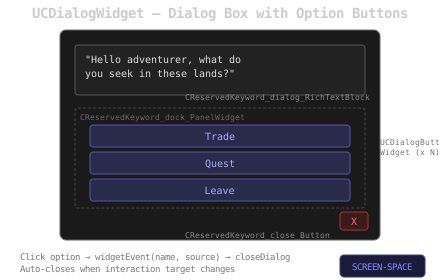
UCDialogWidget visual layout UCDialogWidget visual layout

Overview

UCDialogWidget displays a rich text dialog with a dynamic list of option buttons. It auto-closes when the source actor is destroyed or when the player stops interacting with the target. Each option button is an instance of UCDialogButtonWidget.

UCDialogWidget

Name Description
consume Initializes the dialog: sets source actor, rich text, spawns option buttons and binds close button
closeDialog Fires the ^CLOSE event and removes the widget from viewport
retrieveButtonClass Returns the button widget class (default: CDialogButtonWidgetDefault). Override in Blueprint to customize
// UCDialogWidget receives data via the consume pattern:
// - object: source actor (who is speaking)
// - aText: rich text content
// - nameArray / textArray: parallel arrays of option names and labels
// - event: FCBP_widgetEvent callback fired on option choice or close

// The widget auto-removes when the player stops interacting with the source actor.
// On each tick, it checks if actorToInteractWith still matches the CInteractionComponent state.

// closeDialog fires the event with FName("^CLOSE") then calls RemoveFromParent().

UCDialogButtonWidget

Name Description
consume Initializes the button: sets source actor, label text and click callback
clickIt Executes the widget event with the option name, then calls closeDialog on the parent dialog
// UCDialogButtonWidget receives data via consume:
// - objectArray[0]: source actor
// - objectArray[1]: parent dialog widget
// - aName: option name (FName)
// - aText: display label (FText)
// - event: FCBP_widgetEvent callback

// On click:
//   widgetEvent.ExecuteIfBound(name, sourceActor);
//   ICDialogWidget_::Execute_closeDialog(parent);